



ModFit LT™
ModFit LT follows the proud tradition of its predecessors - innovative features and unmatched flexibility to analyze even the most difficult DNA patterns. This is by far the most versatile DNA analysis software we have ever offered, featuring AutoDebris™, AutoAggregates™, AutoLinearity™, and exceptional batch processing. An intuitive interface and project-based approach make this software a necessity in your laboratory.
ModFit LT is the only open-ended modeling software for cytometry data. Robust models for cell-tracking dye studies and synchronized cell lines are built-in. It is, simply, the industry standard.
 Win 10+
 MacOS 10.14, 11, 12+
Highlights
-
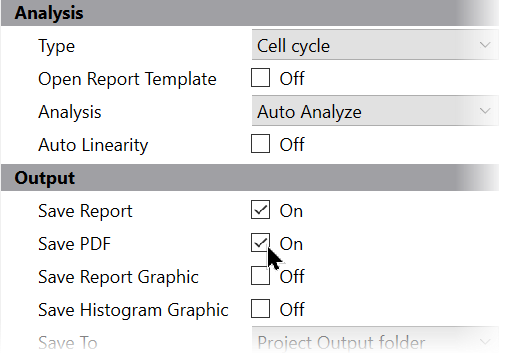
Project-based
Easily organize analysis models, data files, and output
-
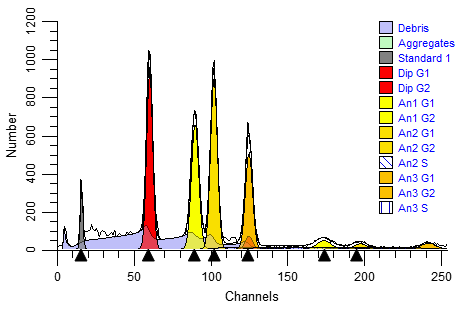
Auto analysis
Objective DNA cell-cycle results for any number of cycling populations
-
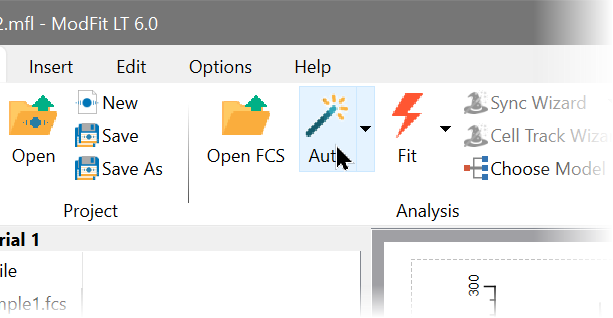
Easy to use
Simplicity for novice users. Powerful for demanding experiments
-
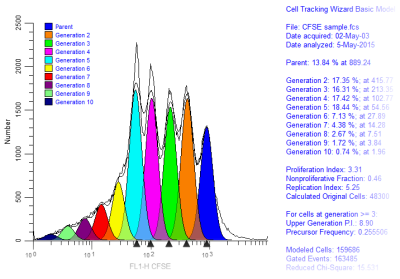
Cell tracking wizard
A wizard anyone can use for CFSE and other cell-tracking experiments
-
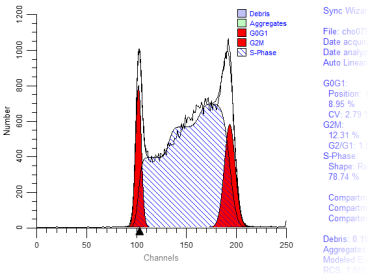
Sync wizard
A powerful tool for your blocking and drug discovery experiments
-
Batch processing
When you have lots of files and little time
-
Industry standard
The most widely used DNA cell-cycle analysis software. Period.

-
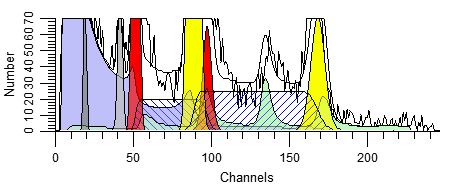
Debris & Aggregates
Automatically remove contaminating events from your DNA cell-cycle results
-
Much more...
- Striking graphics
- Broad instrument support
- Windows & MacOS versions available
Videos
Auto Analysis with a Cell Cycle Project
Analyzing with a Cell Tracking Project
Analysis with a Sync Wizard Project
Creating a Custom Project - Yeast Example
ModFit LT Manual Analysis
Using AutoLinearity in ModFit LT
More Info
Fast, accurate, automatic analysis
Trained on thousands of samples, ModFit LT features a robust analysis engine. The sophisticated peak detection system identifies ploidy patterns and dynamically creates models to match. AutoDebris™, AutoAggregate™, and AutoLinearity™ make analysis robust and consistent. No other cell cycle analysis software comes close!
Cycle Analyzer™
Ploidy determinations are no longer bound to the peak order. Make use of internal standards or an external reference to determine which cycle is classified as Diploid. Any number of cell cycles can be analyzed.
Customized reports
From letterhead graphics to text, ModFit LT imports from the clipboard everything you need to create your own reusable report templates. Save your custom reports with all the text formatting, analysis information, and even the histogram data.
Database and graphic output
ModFit LT allows you to automatically add to a database each time you analyze a data file. Select the items you want to database from an extensive list of results and keywords supported in the sample. Output can be easily opened by programs like Microsoft Excel and your LIS.
Batch processing
Process groups of data files with ease using ModFit LT. The batch system automatically loads data, analyzes, and saves reports. Plus, you can batch process reports for easy review of analysis and printing.
Short learning curve
Simple design and operation make ModFit LT easy to learn and use. We have even created video tutorials to help you get going as quickly as possible.
Download a free version of ModFit LT Rule-Based Training System with your purchase.
New Features
Click here for the latest features and improvements in ModFit LT.
Automatic and manual analysis
While auto analysis is used for the majority of histograms, you can take control of scaling, model selection, and range positioning for manual analysis. A Quick Model Editor makes it easy to make adjustments to the model.
Configuration options
Your system can be custom configured for linearity, S-phase modeling, number of standards, and model colors used by the program. In addition, peak-finding adjustments can fine-tune the program to the subtleties of your data.
Listmode gating
Create high-resolution, 2-parameter gates to select the population to be analyzed. Freehand and polygonal regions make gating quick and efficient, yet each can be modified with the click of a mouse. Gate graphics appear on the report page automatically, making live gate adjustments a snap.
DDE support
Windows versions support Dynamic Data Exchange (DDE), allowing users to create custom extensions and automation solutions for cytometry analysis.
Proven Models
Models built from Gaussian, rectangle, trapezoid, polynomial, AutoDebris™, and AutoAggregate™ components are processed by the Marquardt nonlinear least-squares analysis. The models used in ModFit LT's cytometric analysis have been tested with thousands of histograms to ensure accurate results.
Quantitative S-phase assessment system
Based on a statistical method for determining the standard deviation for the S-phase estimate, ModFit LT provides a p-value for classifying your S-phase result within your laboratory cutoffs.
S-phase cutoff values
Enter your S-phase cutoff values for any type of tissue you analyze. Separate cutoffs are provided for DNA Diploid, DNA Aneuploid, and Total (Average) S-phase percentages.
Synchronization and Cell-Tracking wizards
Analyze synchronized cell lines and other perturbed samples with powerful models created by a simple-yet-sophisticated wizard. Choose from options in the wizard dialog to match the model to your data, and let the wizard do the rest. You can even analyze cell-tracking dye samples like CSFE with the Cell-tracking wizard.
Testimonials
"ModFit and WinList are two great flow cytometric programs, backed by a company with a strong commitment to customer service and satisfaction."
Paul K. Wallace, PhD, Director of Flow Cytometry of Roswell Park Cancer Institute
"ModFit LT is a critical component in our Core Facility for quantitative DNA cell cycle analysis and cell proliferation assays. It is easy to use, robust, reproducible and has superb technical support."
Richard F. Konz, Jr. of UMass Medical School
Starting as a student in the lab of Dr. Cees Cornelisse in Leiden, The Netherlands, I worked with an ICP22 and had to calculate the DNA index and S-phase manually from histograms plotted on calibrated paper. The introduction of the FACScan allowed us to experiment with multiparameter DNA analysis. The combined use of WinList and ModFit was a blessing from the sky. Currently, we perform multiparameter DNA flow cytometry on a daily base using ModFit and WinList for analysis. Especially the collaboration with "The Guys from Verity" is inspiring and results in a continuum of sophisticated improvements of WinList and ModFit.
Willem E. Corver, PhD Dept. of Pathology Leiden University Medical Center The Netherlands
"I have been using ModFit LT since its inception and find it to be the most robust and simultaneously easy-to-use software tool for DNA-ploidy /proliferation analyses on the market. Every time I fire up the program, a wee dram of my favorite single malt drips from my mouse pad."
Frederic I. Preffer, Ph.D. of Massachusetts General Hospital
"Standardized DNA flow cytometry adds valuable information to the diagnosis and prognosis/prediction of different malignant diseases. Thanks to accepted guidelines, high performance instrumentation and finally, but none the least, evaluation software like ModFit LT, it is possible to get safe and reproducible data. Especially, this is the fact when ModFit LT is turned into automatic mode. ModFit LT is used by all DNA flow cytometry laboratories engaged to the Swedish Society of Flow Cytometry (http://www.sfff.se/). Just click on the Auto fit button and ModFit LT will do a perfect fit!"
Bo Baldetorp, Professor, of Department of Oncology, Lund University
"I've been using ModFit LT for cell cycle analysis since the early 90's, and it's never let me down. The software is easy to use, and is very capable of handling the most demanding samples as seen in a multi-user core cytometry resource. I especially value the personal attention and cooperation of the technical staff."
Peter Lopez, Res. Assistant Professor of Pathology of NYU Medical Center
"We have been long time ModFit LT users, both in a research setting and with clinical samples. The cell cycle models give us the answers we need to examine proliferation of T cells or the effects of drug treatment in tumor cell models. We find the proliferation wizard particularly useful, analyzing cell generations stained with CFSE. As always, the best part of ModFit is the support we have received over the years from guys at Verity."
Richard Cross, Ph.D of St. Jude Children's Research Hospital
"As director of a Clinical Flow Cytometry lab and a Flow Cytometry research core, I have used Modfit LT since 1994 and have found it to be an excellent solution for our DNA analysis needs. ModFit LT is versatile and can be used for the analysis of DNA Cell Cycle alone or cell cycle combined with population based surface markers, cytoplasmic markers, nuclear proteins, cyclins, oncoproteins, BrdU, Tunnel, etc. ModFit LT has automatic analysis features as well as models that can be selected manually to fit a variety of diploid and aneuploid situations. And, the ModFit LT Sync Wizard provides great statistically relevant models for the explanation and interpretation of raw research data. Goodness of fit statistics are provided for each model and (so long as the staining has been done competently) I usually strive for a chi square (rcs) less than 4 for research samples. I've used ModFit LT to analyze numerous synchronization studies in pharmaceutical trials to look for perterbations to the normal cell cycle for that particular cell line. Linking ModFit LT to WinList produces a powerful tool with the combined analysis of Cell Cycle and surface, cytoplasmic, nuclear or all four simultaneously. Clinical analysis is automatic and superb. Research capabilities are varied to fit the many cell cycle possibilities that come our way from the huge variety of cell types and species in most research settings. I highly recommend ModFit LT as an analytical tool for those who wish to get the most out of their DNA data."
Jim Price, Ph.D. of Vanderbilt University & VA TVHS Nashville
"In our Core Laboratory, ModFit LT has worked out perfectly for us. With investigators studying varied model systems and instrument users of all different skill levels with respect to flow cytometry and data analysis, finding software that everyone can use is often difficult. ModFit LT allows us to define the level of software access for each user, from novice to advanced; in that way they can safely perform cell cycle analyses only within the scope of their training and understanding of software modeling. This flexibility, coupled with the help of training using the ModFit LT Rules Based Analysis System, has allowed many of our investigators to learn the software rapidly and correctly analyze their data. The best part is that the training resource is so easy to follow that much of it can be learned independently, which reduces the time demands on our two-man staff!
Wayne Green of Flow Cytometry Core Lab, University of Utah Health Sciences Center
"I have used ModFit LT software to model our DNA ploidy samples since the first versions in 1994. I love the flexibility in all (Verity Software House) software products which allows me to "tweak" the analysis to my personal preferences. This is a luxury we don't see in other Flow Cytometry software applications. I have found the ModFit software very easy to use since we can model a case in about 10 seconds using the Automatic Analysis button. The results are accurate and the layout is easy to comprehend. On difficult cases, we can choose the manual mode and print multiple analyses of the same listmode file for the pathologist to decipher. I would recommend this product (and have) to anyone performing DNA ploidy analysis by flow cytometry.
Avis Peters MT(ASCP) QCYM of United Hospital
"I've been using ModFit since version 5.1 (1992). I've still got the manual from that version, and the cover says "DNA Analysis Advances into the Next Generation". It did, and still does - with LT. Incredibly full-featured (more than I know what to do with). The accompanying "Rule-Based Analysis System" is probably the best software documentation I've ever seen – not only for how an application works, but how to USE it."
Marc Langweiler, DVM, PhD of Dartmouth-Hitchcock Medical Center